From zero to $NUTZ.
The long version of How to buy, for someone who has never had a wallet. MetaMask is the example; Trust Wallet works the same way. Phone or computer, your pick. Budget half an hour; the bridge is most of it, and a Robinhood account skips it.
Already a Robinhood customer? Robinhood Wallet is the short route.
The short version is on the Landing: How to buy
01 · Install MetaMask
Get it from metamask.io and nowhere else: the page sends you to your browser's extension store, the App Store or the Play Store. On a phone, check the publisher says MetaMask before you install; fakes exist.
02 · Create the wallet
Open MetaMask and choose Create a new wallet. Set a password; it unlocks the app on this device, nothing more. MetaMask then shows a Secret Recovery Phrase of 12 English words.
Write the 12 words on paper, in order, and keep the paper offline. The phrase is the wallet: anyone who has it has your coins, and MetaMask cannot recover it for you. No cloud notes, no screenshots, no password manager. Nobody from NUTZ, Pons, Robinhood or MetaMask will ever ask for it.
03 · Add Robinhood Chain
MetaMask starts on Ethereum. $NUTZ lives on Robinhood Chain, so the wallet needs it. The easy way: open this site inside MetaMask and press Connect. On a phone that means the browser in MetaMask's Explore tab, typing nutz.wtf there; other phone browsers mostly can't reach MetaMask. On a computer the extension is enough: open nutz.wtf in that browser. Pick MetaMask, approve, and the site asks MetaMask to add Robinhood Chain and switch to it. Confirm both.
With MetaMask's phone app the whole step looks like this:
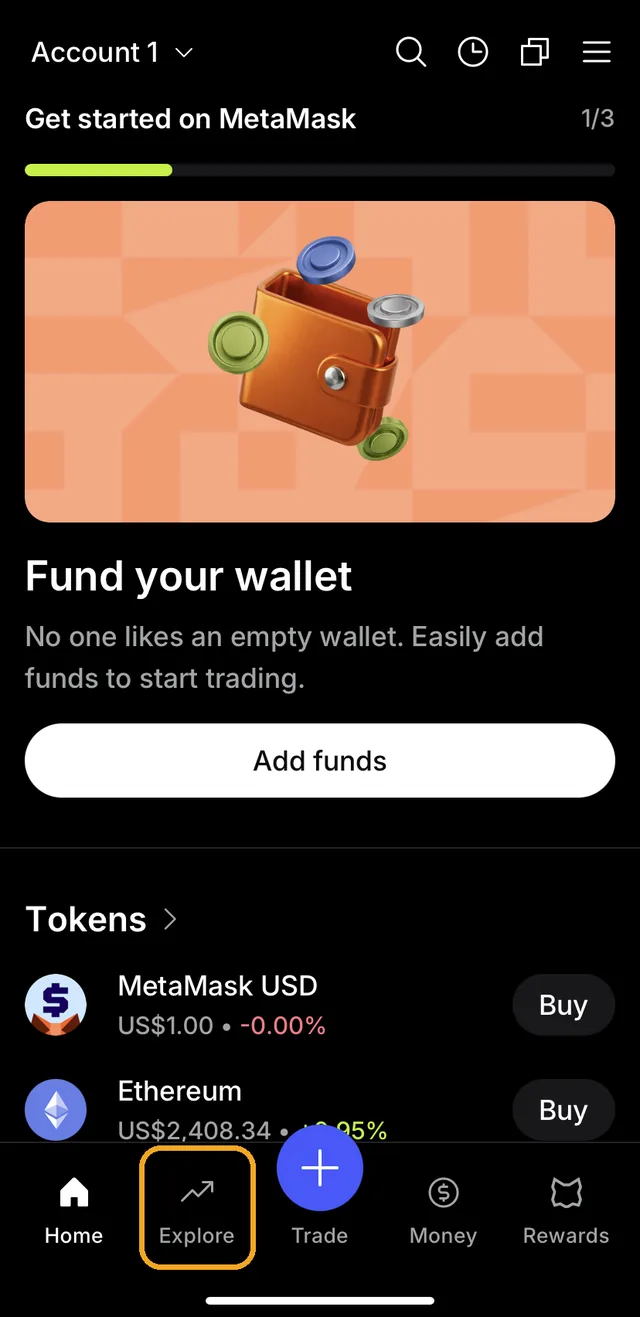
1. Open MetaMask. The browser is behind the Explore tab. 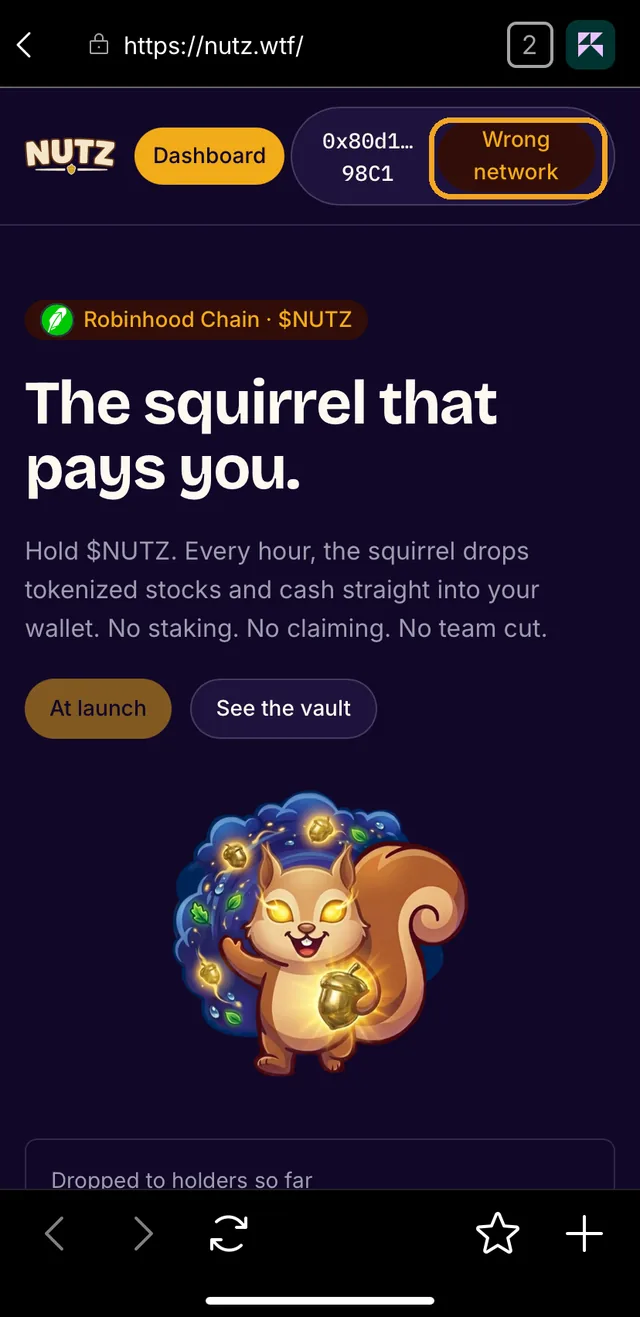
2. Type nutz.wtf in that browser, press Connect, pick MetaMask. Connected, the button says Wrong network: MetaMask is still on Ethereum. 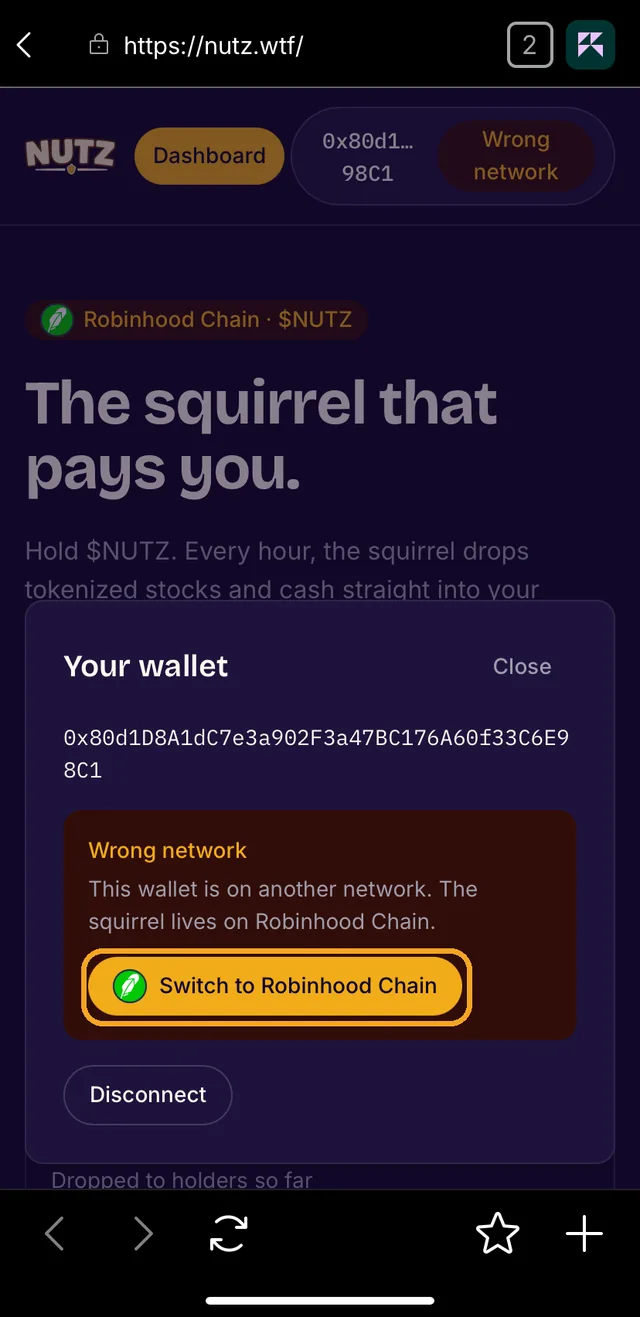
3. Tap it. Your wallet opens with Switch to Robinhood Chain. 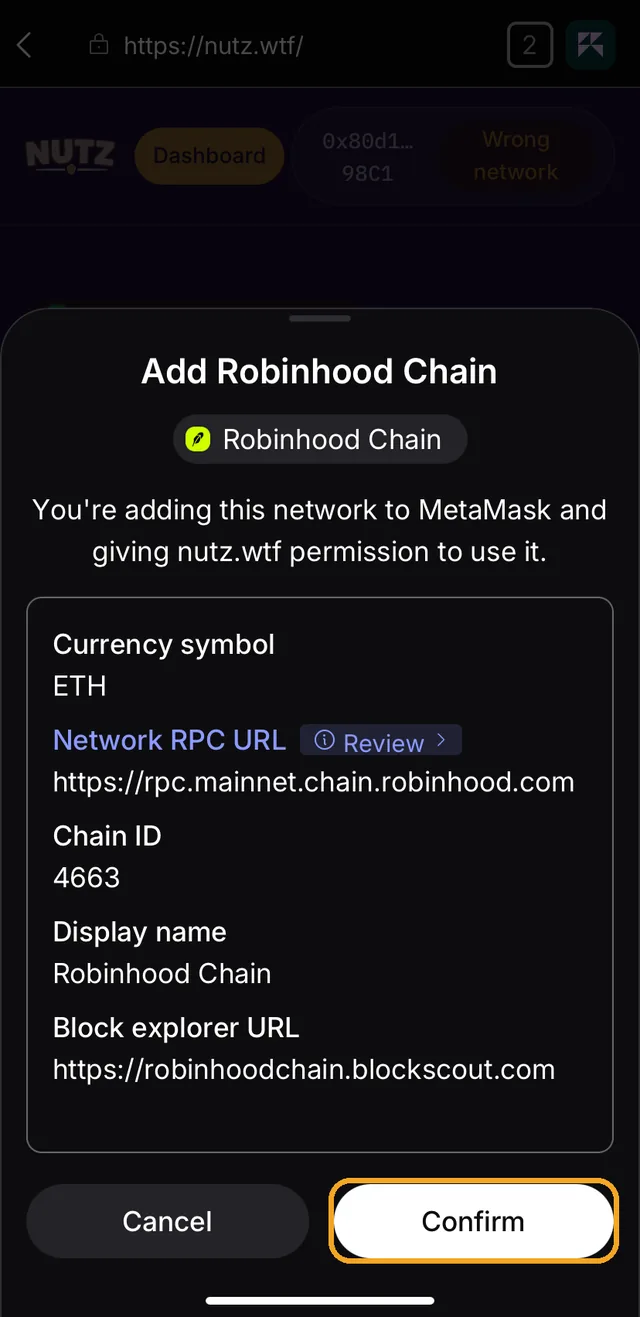
4. MetaMask asks to add the chain. The values are the ones in the table below; compare them, then Confirm. 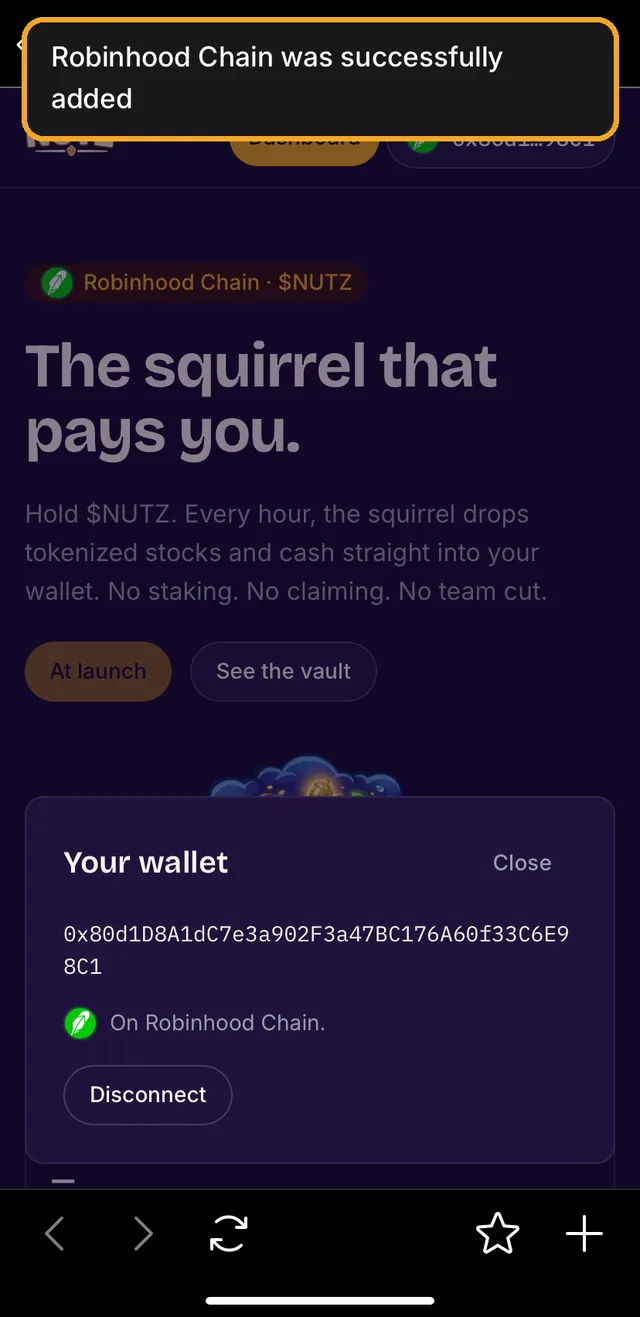
5. MetaMask confirms the chain was added, and the site says On Robinhood Chain. 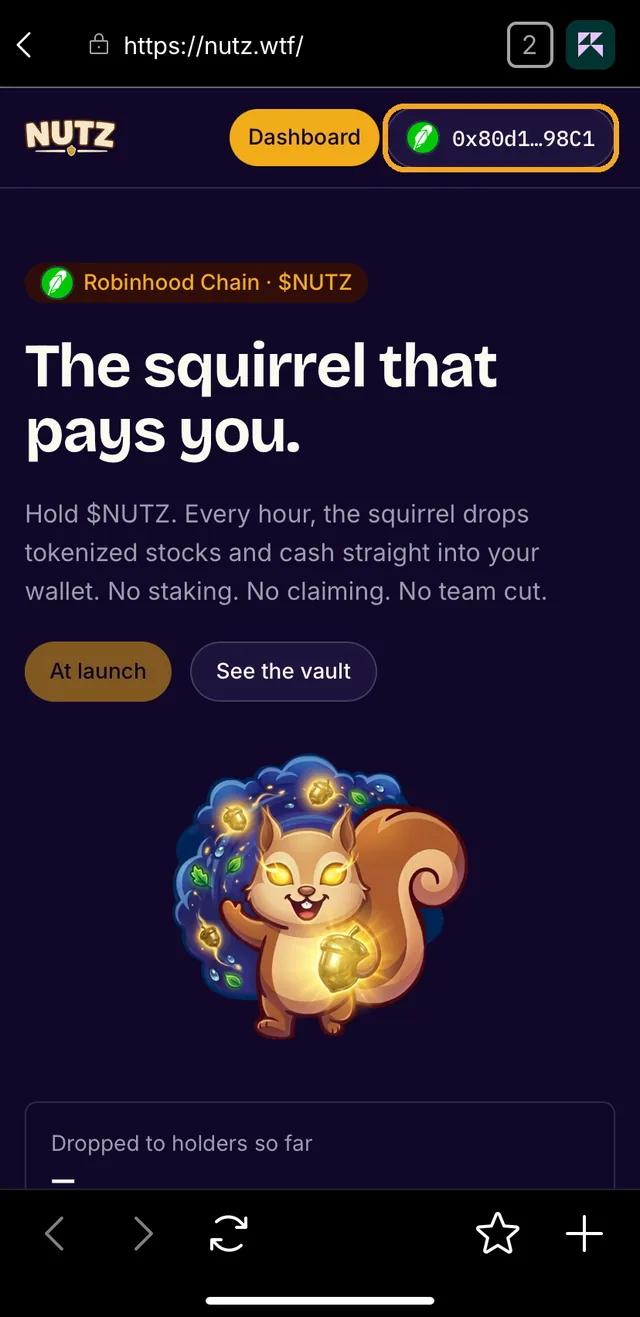
6. Back on the page, the feather beside your address means you're on Robinhood Chain. Done.
By hand instead: in the extension, the menu, then Networks, then Add a custom network. In the app, the network picker at the top of the Tokens tab, then Custom, then Add a custom network. The values are Robinhood's own:
- Network name
- Robinhood Chain
- RPC URL
- https://rpc.mainnet.chain.robinhood.com
- Chain ID
- 4663
- Currency symbol
- ETH
- Block explorer URL
- https://robinhoodchain.blockscout.com
04 · Get ETH onto Robinhood Chain
Gas on Robinhood Chain is paid in ETH, and so is $NUTZ. Your new wallet has none. Two ways in.
The short way needs a Robinhood account. Buy ETH in the Robinhood app, then send it: ETH, Send, network Robinhood Chain, and paste the address MetaMask shows. Robinhood adds no fee of its own and it lands in minutes. Not offered in New York.
The long way, without one, is two moves. First, ETH on Ethereum: buy it where you already buy crypto and withdraw it to your MetaMask address on the Ethereum network. Copy the address from MetaMask, never type it. Start small.
Then bridge it. Open the bridge Robinhood names, Ethereum to Robinhood Chain, connect MetaMask, enter an amount, confirm. Deposits land in about ten minutes. Coming back takes about seven days, so move what you mean to spend plus a little for gas, no more. A deposit that fails on the Robinhood side can be redeemed from the bridge within seven days.
We know of no card-to-Robinhood-Chain shortcut. Anyone offering one in a DM is not helping you.
05 · Buy on Pons
Pons is the launchpad $NUTZ trades on, at ponsfamily.com. Open the $NUTZ page from this site, never from a search or a message: anyone can name a token NUTZ, nobody can copy the address.
Token
0x5a8e6bb390b51978b0cea029a070cfcdd495138eBlockscoutOn Pons, connect your wallet the same way, enter the ETH amount, read the price impact, set a slippage you can live with, press buy, and confirm in the wallet. Every trade pays a 1% fee plus a 10% creator tax. Pons keeps 30% of the fee; everything else goes to the Nut Vault, and that is where your drops come from. For the first seconds after launch Pons taxes buys at up to 99%, falling fast to zero, so don't race the launch: a minute later costs nothing extra.
06 · See it in your wallet
MetaMask may not list $NUTZ on its own. Import it by address: in the extension, the tokens list's menu, Manage tokens, Add custom token; in the app, the + above the tokens list, then Custom token. Paste the address from this page, Next, Import.
Then look the same address up on the explorer. The explorer is the truth; the wallet is a view of it.
07 · Hold. Get paid.
That's it. Every hour the squirrel drops stocks and cash into every wallet that holds $NUTZ. Nothing to stake, nothing to claim. Open the Dashboard with the same wallet to watch them land.
Shorter: Robinhood Wallet
Robinhood Wallet is Robinhood's own self-custody app, separate from your Robinhood account, and it ships with Robinhood Chain built in: no network to add. With a Robinhood account the whole guide is four moves and no bridge.
- Install Robinhood Wallet from robinhood.com/wallet, create the wallet, and keep the recovery phrase on paper, as in step 2.
- Fund it from the Robinhood app: buy ETH, Send, network Robinhood Chain, address the one Robinhood Wallet shows under Receive. Minutes, no Robinhood fee, no bridge. Not offered in New York.
- In the wallet's Web3 tab, the globe, type nutz.wtf and tap Buy on Pons: that opens the real $NUTZ page. On Pons, press Connect and pick Robinhood Wallet, or WalletConnect and then Robinhood Wallet. On a computer, do the same in your browser and scan Pons's WalletConnect code with the wallet's Scan icon. This site itself needs no connection.
- Buy as in step 5. If the wallet doesn't show $NUTZ afterwards, the explorer in step 6 does. To watch the drops, the Dashboard takes any address: paste yours, no connection needed.
robinhood.com/wallet · Robinhood's connect-to-dapps page
Robinhood's pages put the Web3 tab on iPhone; on Android, use the computer route or MetaMask. This route is written from Robinhood's own pages; the screenshots above are MetaMask's for now.
Before you tap confirm
- The recovery phrase stays on paper. No site, app or person ever needs it.
- The only $NUTZ address is the one on this page. Compare the whole thing, not the first and last characters.
- MetaMask from metamask.io, Robinhood Wallet from robinhood.com. Pons at ponsfamily.com. The bridge from the link above. Lookalike domains exist.
- Every transaction is a prompt in your wallet. Read what it asks before you confirm; nothing on-chain can be undone.
- Keep a little ETH for gas after the buy, or the next move waits for another bridge.
- Nobody from NUTZ DMs you first. Support in a DM is a scam.
Anyone can launch a token called NUTZ. The real one is the address on this page. If it isn't here, it isn't the squirrel.